
Trigger ISS SecurOS Event
Trigger a Analytics Event in ISS SecurOS VMS
Overview
This node triggers a event in ISS SecureOS VMS based on specified trigger conditions. The event can be used to generate alerts, review incidents and more.
Configured descriptions support Jinja templates. Descriptions from previous nodes take precedence and are sent as plain text, without evaluating template syntax. When an upstream description is missing or empty, the configured description is used.
Inputs & Outputs
- Inputs : 1, Media Format : Raw Video
- Outputs : 1, Media Format: Raw Video
- Output Metadata : None
Properties
| Property | Description | Type | Default | Required |
|---|---|---|---|---|
enabled | Enabled | bool | true | No |
iss_ip | Hostname or IP of the ISS Server. Conditional on enabled being true. | string | null | Yes |
iss_port | ISS Lumeo Script port. Leave blank to use defaults (3443). Conditional on enabled being true. | string | 3443 | Yes |
iss_password | ISS Lumeo Script password. Conditional on enabled being true. | string | null | Yes |
iss_camera_ids | Associates Events with these Camera IDs from ISS. Comma separated list. Conditional on enabled being true. | string | null | Yes |
iss_action | Create a Event in ISS. Options: Create Event (event); Create Event and Record (event_and_record); Create Event, Recording and Subtitle (event_and_record_and_subtitle). | enum | event | Yes |
record_duration | Duration of the recording in seconds. Leave blank to use default of 5 seconds. Unit: seconds. | float | 5 | No |
interval | Min. time between consecutive actions. Unit: seconds. | float | 0 | Yes |
event_source | Generate ISS Events from events generated by other nodes or a Custom defined event. Options: Events from previous nodes (built_in); Custom Event (custom). | enum | built_in | Yes |
trigger | Send an event when this condition evaluates to true. Conditional on event_source being custom. | trigger-condition | null | Yes |
event_name | Event name that shows up in ISS console. Max. length of 32 characters. Accepts templates. Conditional on event_source being custom. | string | null | Yes |
event_description | Event description that shows up in ISS console. Max. length of 100 characters. Accepts templates. | string | null | No |
Event Name & Description Templates
event_description (and, for a Custom Event source, event_name) use Jinja2 Template Syntax for customizing the name and body of the Event sent to Wave.
Variables available to the template:
| Variable | Description |
|---|---|
deployment_id | Deployment ID. |
deployment_name | Deployment Name. |
application_id | Application ID. |
application_name | Application Name. |
gateway_id | Gateway ID. |
gateway_name | Gateway Name. |
node_id | Node ID. |
meta.nodes | Node metadata. |
meta.objects | Object metadata. |
meta.custom_property | Custom properties inserted using a Custom function. |
Examples
Static text content:
Fire was detected in the parking lotInsert description from an existing node:
{{ nodes.gpt1.fullframe.label }}Output Metadata
Node does not insert any output metadata; upstream metadata continues through the pipeline
ISS SecurOS Configuration
Install nodejs modules in SecureOS
- Installing additional packages in Windows OS
To install the package, do the following:
- Open a command line in administrator mode and navigate to the working directory of scripts (
C:\Program Files (x86)\ISS\SecurOS\bin64\node.js). - Enter the command to run the npm installation script:
.\npm.bat install express selfsigned
- Installing additional packages in Linux OS
To install the package, do the following:
- Open a command prompt and navigate to the working directory of scripts (
node.js). - Enter the command to run the npm installation script:
sudo ./npm.sh install express selfsigned
Add nodejs script for lumeo events
Copy the following script into a new nodejs script within SecureOS configuration under Integration & Automation section.
Remember to change the default auth token to some random value and provide that to this node's configuration in Lumeo in the password field.
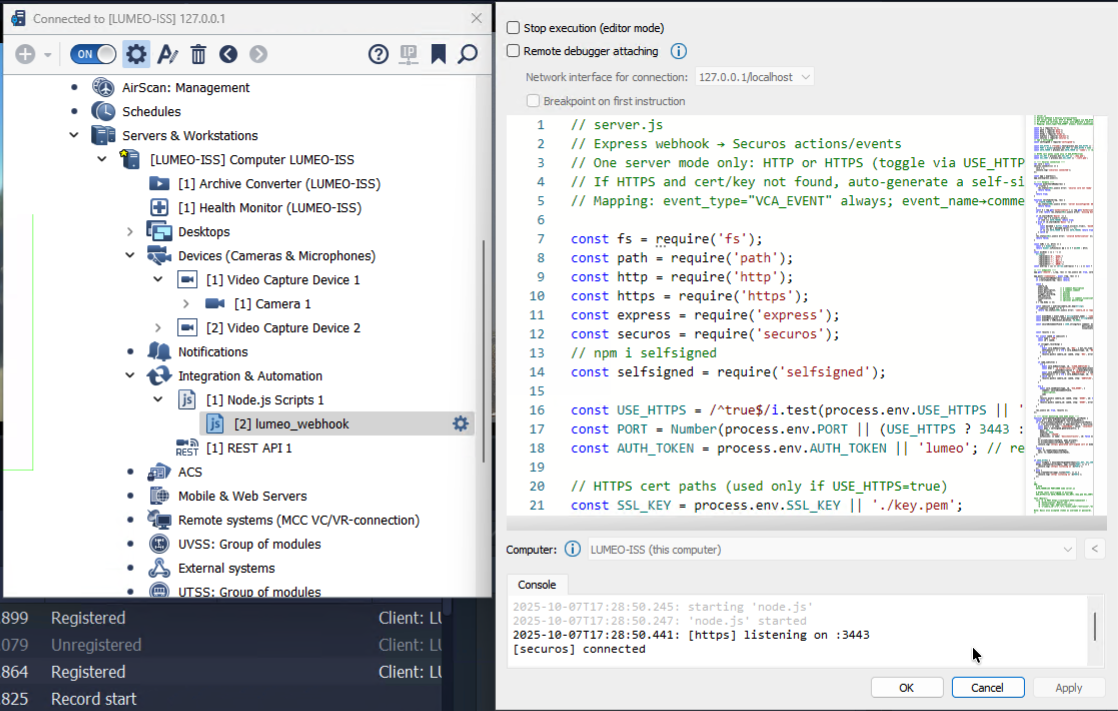
Create a new Node.js script in ISS SecurOS
// server.js
// Express webhook → Securos actions/events
// One server mode only: HTTP or HTTPS (toggle via USE_HTTPS=true)
// If HTTPS and cert/key not found, auto-generate a self-signed cert.
// Mapping: event_type="VCA_EVENT" always; event_name→comment; event_description→description.
const fs = require('fs');
const path = require('path');
const http = require('http');
const https = require('https');
const express = require('express');
const securos = require('securos');
// npm i selfsigned
const selfsigned = require('selfsigned');
const AUTH_TOKEN = process.env.AUTH_TOKEN || 'lumeo'; // required. Set it to a random string.
const USE_HTTPS = true;
const PORT = Number(3443);
// HTTPS cert paths (used only if USE_HTTPS=true)
const SSL_KEY = process.env.SSL_KEY || './key.pem';
const SSL_CERT = process.env.SSL_CERT || './cert.pem';
// ---- Securos connection ----
let core = null;
securos.connect((c) => {
core = c;
console.log('[securos] connected');
});
const app = express();
app.use(express.json());
// ---- helpers ----
function assertCoreReady(res) {
if (!core) {
res.status(503).json({ error: 'securos core not ready' });
return false;
}
return true;
}
function verifyAuth(req, res) {
if (!AUTH_TOKEN) {
res.status(500).json({ error: 'server misconfigured: AUTH_TOKEN missing' });
return false;
}
const h = req.get('authorization') || req.get('Authorization');
if (!h) return res.status(401).json({ error: 'missing Authorization header' });
if (h.startsWith('Bearer ')) {
const tok = h.slice(7).trim();
if (tok === AUTH_TOKEN) return true;
} else if (h.startsWith('Basic ')) {
try {
const decoded = Buffer.from(h.slice(6).trim(), 'base64').toString('utf8');
const [u, p] = decoded.split(':', 2);
if (u === AUTH_TOKEN || p === AUTH_TOKEN) return true;
} catch {}
}
res.status(401).json({ error: 'invalid Authorization' });
return false;
}
const toMs = (v, dflt) => {
const n = Number(v);
return Number.isFinite(n) && n >= 0 ? n*1000 : dflt;
};
const escHtml = (s = '') =>
String(s)
.replaceAll('&', '&')
.replaceAll('<', '<')
.replaceAll('>', '>')
.replaceAll('"', '"')
.replaceAll("'", ''');
const asArray = (x) => (Array.isArray(x) ? x : x == null ? [] : [x]);
// ---- endpoints ----
app.get('/health', (_req, res) => res.json({ ok: true, coreReady: !!core, https: USE_HTTPS }));
app.post('/lumeoevent', async (req, res) => {
if (!assertCoreReady(res)) return;
if (!verifyAuth(req, res)) return;
const {
camera_id,
event_name, // → comment.description
event_description, // → comment.comment
event_duration, // seconds
trigger_recording, // boolean
add_subtitle, // boolean
visualization, // optional -> comment.visualization
cams // optional passthrough
} = req.body || {};
const camsList = asArray(camera_id).map(String);
if (camsList.length === 0) {
return res.status(400).json({ error: 'camera_id is required' });
}
const eventName = event_name ? String(event_name) : 'Lumeo Event';
const eventDescription = event_description ? String(event_description) : '';
const eventMs = toMs(event_duration, 10_000);
const secureOsCommentField = JSON.stringify({ comment: eventDescription,
description: eventName,
visualization: visualization });
const results = [];
for (const camId of camsList) {
const type = 'CAM';
const id = camId;
if (trigger_recording) {
try {
await core.doReact(type, id, 'REC', { hot_rec_time: eventMs });
setTimeout(() => { try { core.doReact(type, id, 'REC_STOP'); } catch {} }, eventMs + 500);
} catch (e) {
results.push({ camera_id: camId, step: 'REC', error: String(e?.message || e) });
}
}
if (add_subtitle) {
try {
await core.doReact(type, id, 'CLEAR_SUBTITLES');
const html = `<p style="color:red;">${escHtml(eventName || 'Event')}</p>` +
(eventDescription ? `<p>${escHtml(eventDescription)}</p>` : '');
await core.doReact(type, id, 'ADD_SUBTITLES', { command: html });
setTimeout(() => { try { core.doReact(type, id, 'CLEAR_SUBTITLES'); } catch {} }, eventMs);
} catch (e) {
results.push({ camera_id: camId, step: 'SUBTITLES', error: String(e?.message || e) });
}
}
try {
await core.sendEvent(type, id, 'VCA_EVENT', {
comment: secureOsCommentField,
//description,
cams
});
results.push({ camera_id: camId, step: 'EVENT', ok: true });
} catch (e) {
results.push({ camera_id: camId, step: 'EVENT', error: String(e?.message || e) });
}
}
res.json({ ok: true, results });
});
// ---- server bootstrap (one mode only) ----
function ensureSelfSignedCertSync(keyPath, certPath) {
const dir = path.dirname(path.resolve(keyPath));
if (!fs.existsSync(keyPath) || !fs.existsSync(certPath)) {
if (!fs.existsSync(dir)) fs.mkdirSync(dir, { recursive: true });
const attrs = [{ name: 'commonName', value: 'localhost' }];
const pems = selfsigned.generate(attrs, {
days: 365,
keySize: 2048,
algorithm: 'sha256',
extensions: [{ name: 'basicConstraints', cA: false }],
});
fs.writeFileSync(keyPath, pems.private);
fs.writeFileSync(certPath, pems.cert);
console.log(`[https] generated self-signed cert at ${keyPath}, ${certPath}`);
}
return {
key: fs.readFileSync(keyPath),
cert: fs.readFileSync(certPath),
};
}
if (USE_HTTPS) {
const tlsOpts = ensureSelfSignedCertSync(SSL_KEY, SSL_CERT);
https.createServer(tlsOpts, app).listen(PORT, () => {
console.log(`[https] listening on :${PORT}`);
});
} else {
http.createServer(app).listen(PORT, () => {
console.log(`[http] listening on :${PORT}`);
});
}
/*
ENV:
# HTTP
AUTH_TOKEN=shh PORT=3000 node server.js
# HTTPS (auto self-signed if missing)
USE_HTTPS=true AUTH_TOKEN=shh SSL_KEY=./key.pem SSL_CERT=./cert.pem PORT=3443 node server.js
Test (Bearer):
curl -k -X POST https://localhost:3443/lumeoevent \
-H 'Authorization: Bearer shh' \
-H 'Content-Type: application/json' \
-d '{"camera_id":["1","2"],"event_name":"Intrusion","event_description":"Person at gate","trigger_recording":true,"recording_duration":12000,"add_subtitle":true,"subtitle_duration":4000,"visualization":"rect:10,10,30,40;color:255,0,0"}'
Note: Basic also accepted (token as username or password).
*/Updated 1 day ago