
Lumeo WebRTC Tester
Run the Diagnostic test below from a client browser to determine if your network is blocking WebRTC playback.
Note: This tool tests for network blocks on the client device/browser. For streaming to work, Lumeo Gateway must be unblocked as well. To check the Gateway, you can run a WebRTC connection check from Lumeo Gateway's web interface.
Connectivity Tester
WebRTC Browser Logs
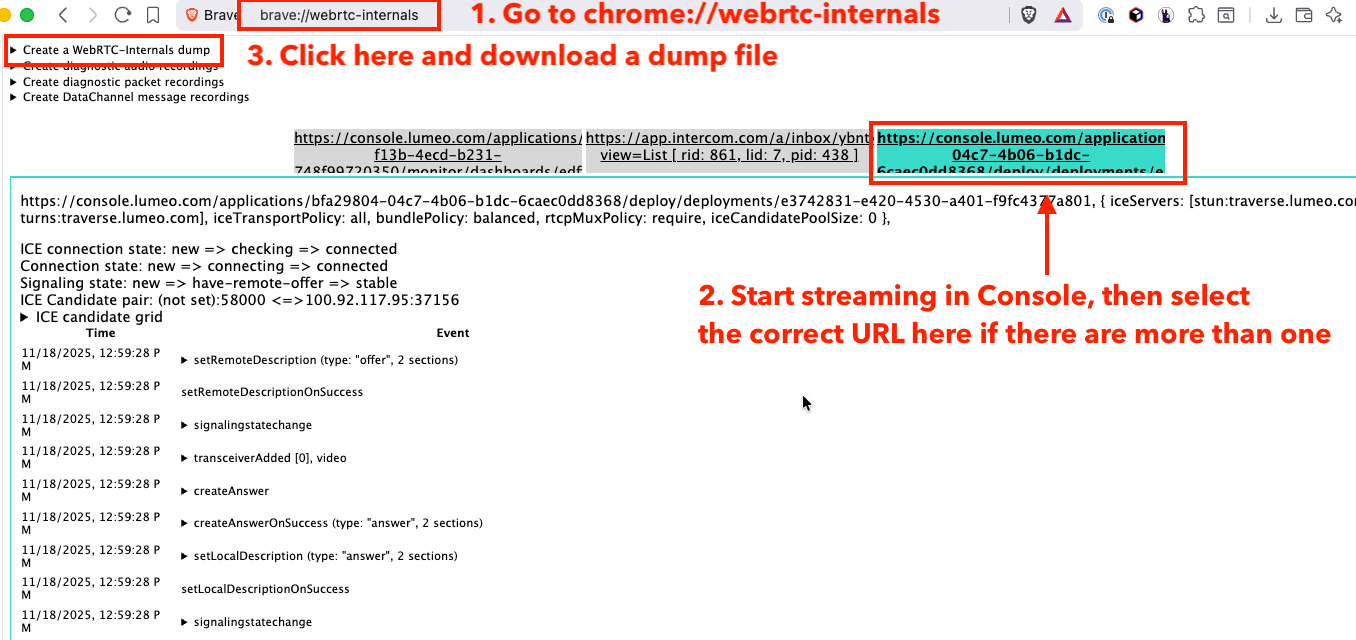
If the connectivity tester above shows that all the ports are unblocked, and yet you are unable to stream in the Lumeo console, follow the steps below to generate WebRTC logs and share them with Lumeo support for further troubleshooting.
We recommend running the following test with Chrome or Brave browser.
- In a separate tab in your browser, type
chrome://webrtc-internalsto open the WebRTC page. - Go to Lumeo console and try to play a stream
- Go back to WebRTC internals tab, and select the tab corresponding to the playback page
- Wait a few minutes, then click
Create a WebRTC-internals dump - Download the dump file and email that to Lumeo support.
Updated 6 days ago
Did this page help you?