
Trigger Hanwha Blaze Event
Trigger a Generic Event in Hanwha Blaze VMS
Overview
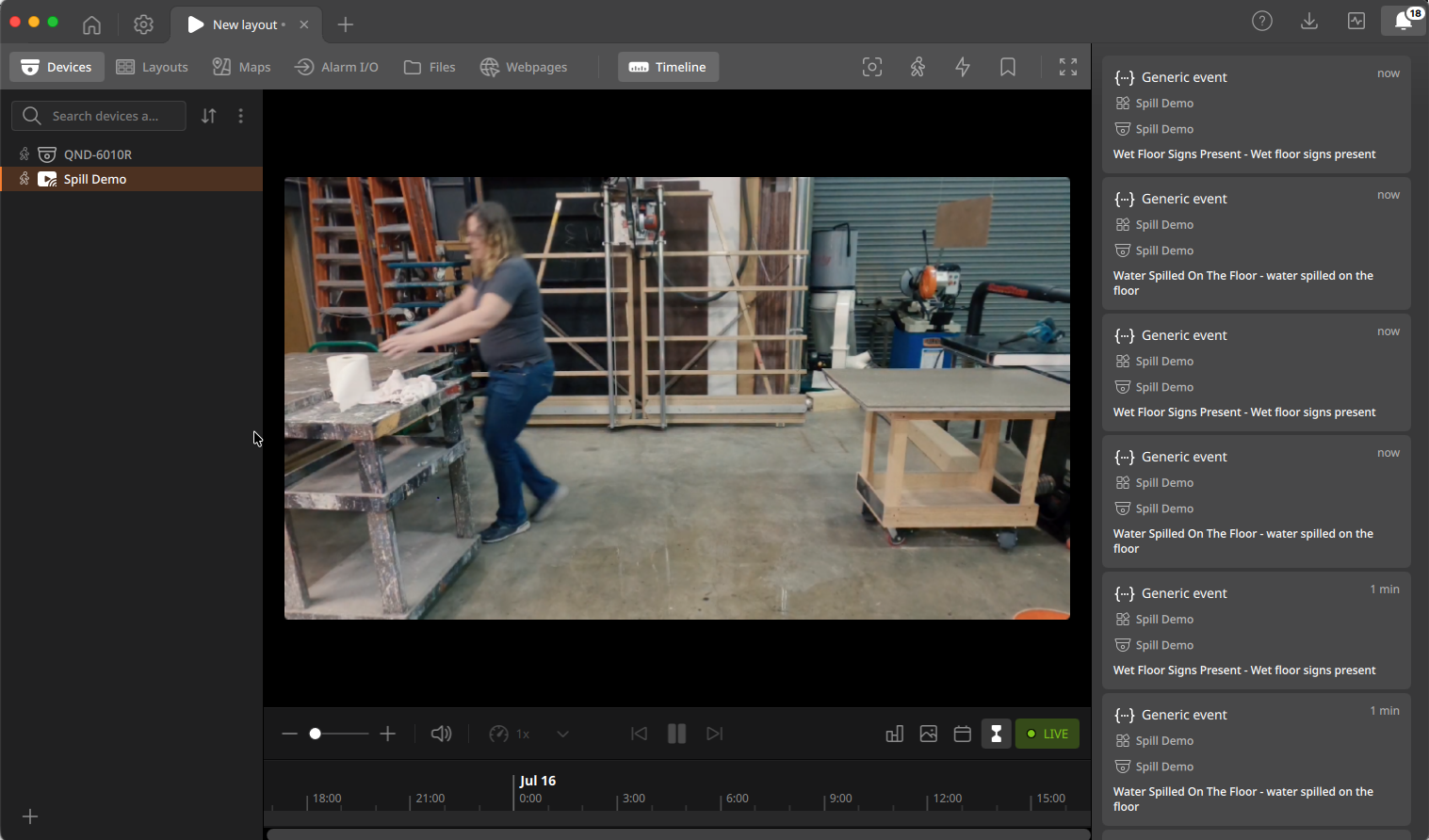
This node triggers Events or Bookmarks in Hanwha BLAZE VMS based on specified trigger conditions. The event can be used to generate alerts, review incidents and more.
Inputs & Outputs
- Inputs : 1, Media Format : Raw Video
- Outputs : 1, Media Format: Raw Video
- Output Metadata : None
Properties
| Property | Description | Type | Default | Required |
|---|---|---|---|---|
enabled | Enabled | bool | true | No |
blaze_ip | Hostname or IP of the BLAZE Server. Conditional on enabled being true. | string | null | Yes |
blaze_port | BLAZE Server port. Leave blank to use default (8000). Conditional on enabled being true. | string | null | No |
blaze_username | BLAZE user name. Conditional on enabled being true. | string | null | Yes |
blaze_password | BLAZE user password. Conditional on enabled being true. | string | null | Yes |
blaze_channel_id | Associates Events with this Channel ID from BLAZE. Leave blank if source is an RTSP stream from BLAZE. Conditional on enabled being true. | string | null | No |
blaze_action | BLAZE action. Options: Create Generic Event (event): Create a Generic Event in BLAZE with the source Lumeo; Create Button Event (button_event): Create a Button Event in BLAZE. Name must match Button name from a BLAZE rule; Create Bookmark (bookmark): Create a Bookmark in BLAZE. | enum | event | Yes |
blaze_button_name | Associates Button Events with this Button Name from BLAZE. Conditional on blaze_action being button_event. | string | null | Yes |
interval | Min. time between consecutive actions. Unit: seconds. | float | 0 | Yes |
event_source | Generate BLAZE Events from events generated by other nodes or a Custom defined event. Options: Events from previous nodes (built_in); Custom Event (custom). | enum | built_in | Yes |
trigger | Send an event when this condition evaluates to true. Conditional on event_source being custom. | trigger-condition | null | Yes |
event_name | Event name (caption) that shows up in BLAZE console. Accepts templates. Conditional on event_source being custom. | string | null | Yes |
event_description | Event description that shows up in BLAZE console. Accepts templates. | string | null | No |
Event Name & Description Templates
event_description (and, for a Custom Event source, event_name) use Jinja2 Template Syntax for customizing the name and body of the Event sent to BLAZE.
Variables available to the template:
| Variable | Description |
|---|---|
deployment_id | Deployment ID. |
deployment_name | Deployment Name. |
application_id | Application ID. |
application_name | Application Name. |
gateway_id | Gateway ID. |
gateway_name | Gateway Name. |
node_id | Node ID. |
meta.nodes | Node metadata. |
meta.objects | Object metadata. |
meta.custom_property | Custom properties inserted using a Custom function. |
Examples
Static text content:
Fire was detected in the parking lotInsert description from an existing node:
{{ nodes.gpt1.fullframe.label }}Output Metadata
Node does not insert any output metadata; upstream metadata continues through the pipeline
BLAZE Configuration
Create a user for Lumeo
Create a BLAZE user for Lumeo with appropriate permissions to generate events. Provide this username and password in this node's settings.
Grab BLAZE Channel ID
Grab the BLAZE Channel ID for your camera to associate Lumeo events with the camera if your source is not a BLAZE RTSP stream.
If your video source is an RTSP stream from BLAZE (e.g.
rtsp://<blaze-host>/<channel-id>/primary), you can leave theblaze_channel_idfield empty. Lumeo will automatically extract the Channel ID from the stream URI.
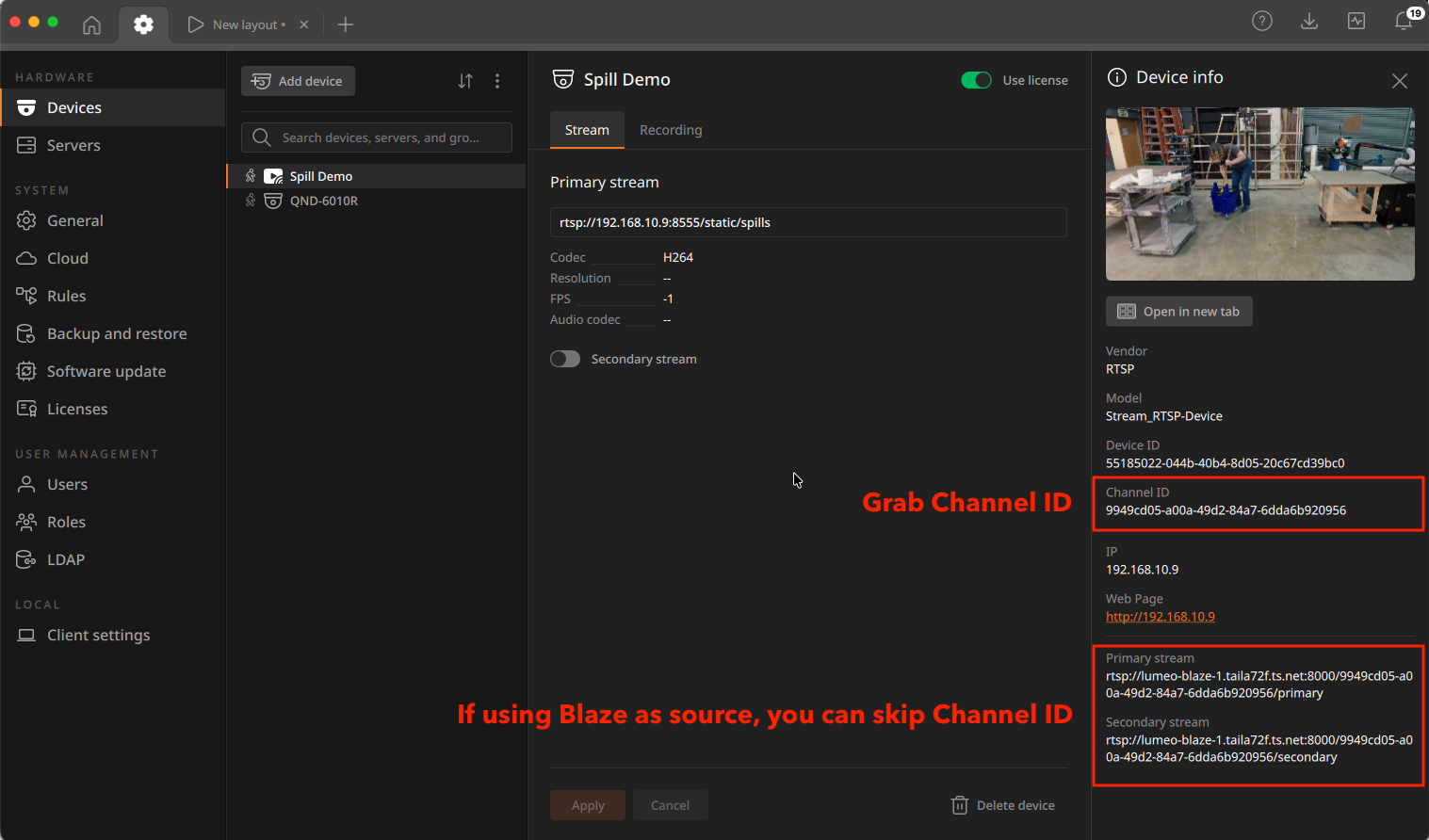
Associate Lumeo source with BLAZE camera
Follow the steps below if you set up the camera or stream directly in Lumeo without sourcing it from BLAZE:
- Create an RTSP stream or ONVIF Camera directly in Lumeo
- Find the corresponding Channel ID from the BLAZE admin console
- Add the BLAZE Channel ID to the Trigger Hanwha BLAZE Event node in Lumeo
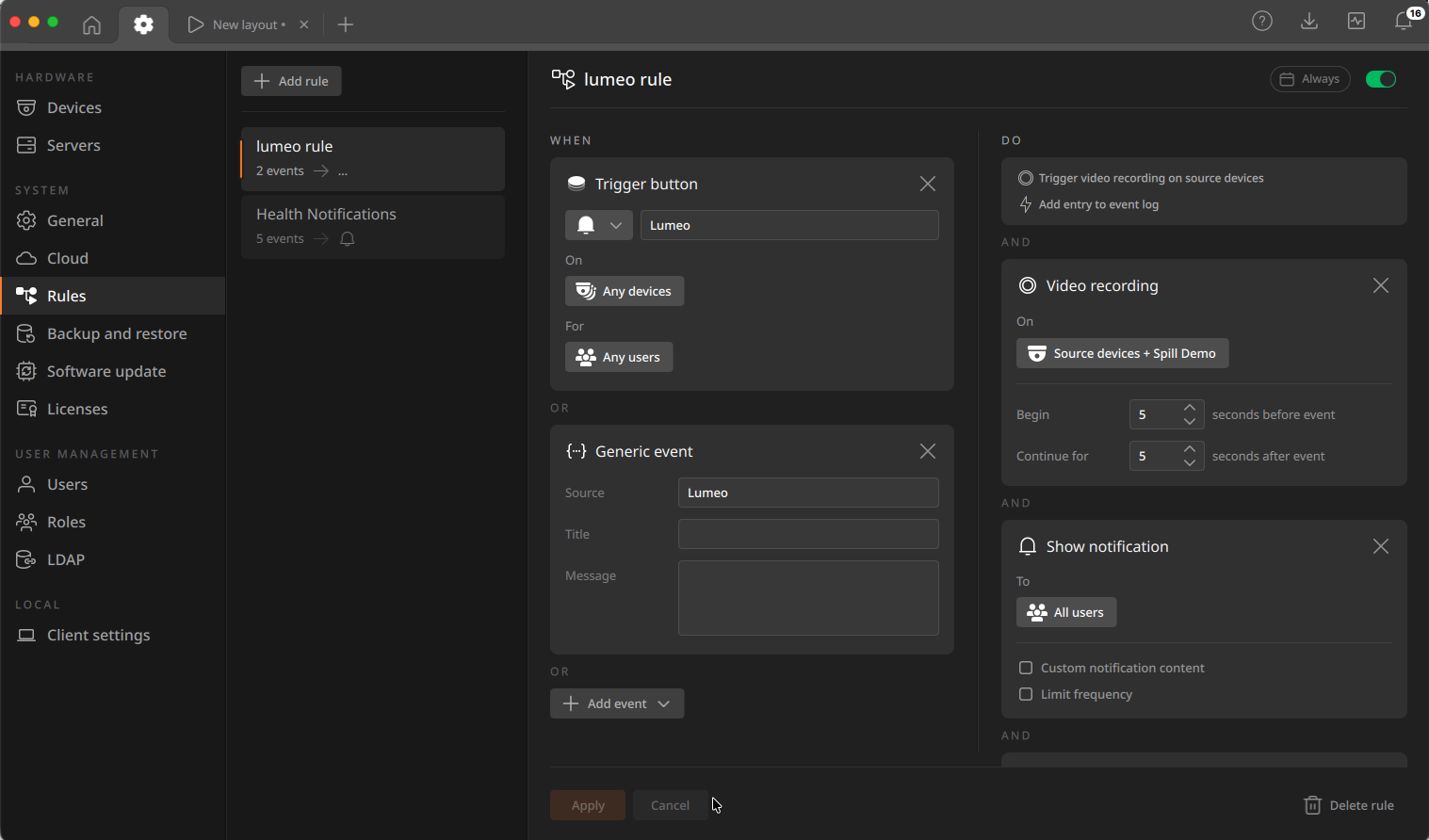
Configure Button or Generic Event rules in BLAZE
Lumeo sends events to BLAZE, but to get them to show up with the appropriate camera, you need the following:
- Ensure the Camera is set to allow recording in BLAZE
- Create a rule in BLAZE with the button name (for Button events) or Generic Event Source name as Lumeo (for Generic events) that triggers Recording/Notifications/Bookmarks in BLAZE.
Updated 18 days ago